Friday, March 11, 2016

Thursday, March 3, 2016
PowerBuilder - Find windows where datawindow is used
If You have a listo of datawindows and would like to make a list of windows where each of these datawindows are used, this Power-Shell function might help.
By tweaking it You could search for whatewher You need, but basic concept is below.[Console]::OutputEncoding = [System.Text.Encoding]::UTF8
$windowTitles = "windowsTitles.txt"
New-Item $windowTitles -type file -force
function search ([string]$fullName) {
$shortName = [io.path]::GetFileNameWithoutExtension($fullName)
$files = gci -include *.srw,*.sru,*.srd -recurse | select-string $shortName | group path | select name
$found = 0
if ($files.Count -eq 0) { return 0 }
foreach ($file in $files)
{
$shortName2 = [io.path]::GetFileNameWithoutExtension($file.Name) if ($shortName -eq $shortName2) { continue }
$found = $found + 1
Write-Host "Used in: " $shortName2
If ($file.Name.EndsWith(".srw")) {
Write-Host "Used in: " $shortName2 " and its a WINDOW!"
$titleString = Get-Content $file.Name | select-string -pattern "string title = "
if (-not $titleString) {
Write-Host "Window has no title"
Return 1
}
Write-Host "Windows title is:" $titleString
$title = $titleString.line.replace("string title = ","")
# write title to file
Add-Content -Encoding UTF8 $windowTitles $title
Return 1
} Else {
Return search($file.Name)
}
}
Return $found
}
Use it something like this ( is same PS1 file for example ) :
 $files = gci -include *.srd -recurse | Where-Object {$_.FullName -like "*\$folder\*"} | select-string '!!!!ADD YOUR REGEX HERE!!!' | group path | select name
 Write-Host "Found number of datawindows:"
 Write-Host $files.Count
 $index = 0
 foreach ($file in $files)
 {
  if (-Not $file.Name) {break}
    $dwShortName =  [io.path]::GetFileNameWithoutExtension($file.Name)
  Write-Host "Searching for: " $dwShortName
    $found = search($file.Name)
   }
Tuesday, March 1, 2016
Monday, December 30, 2013
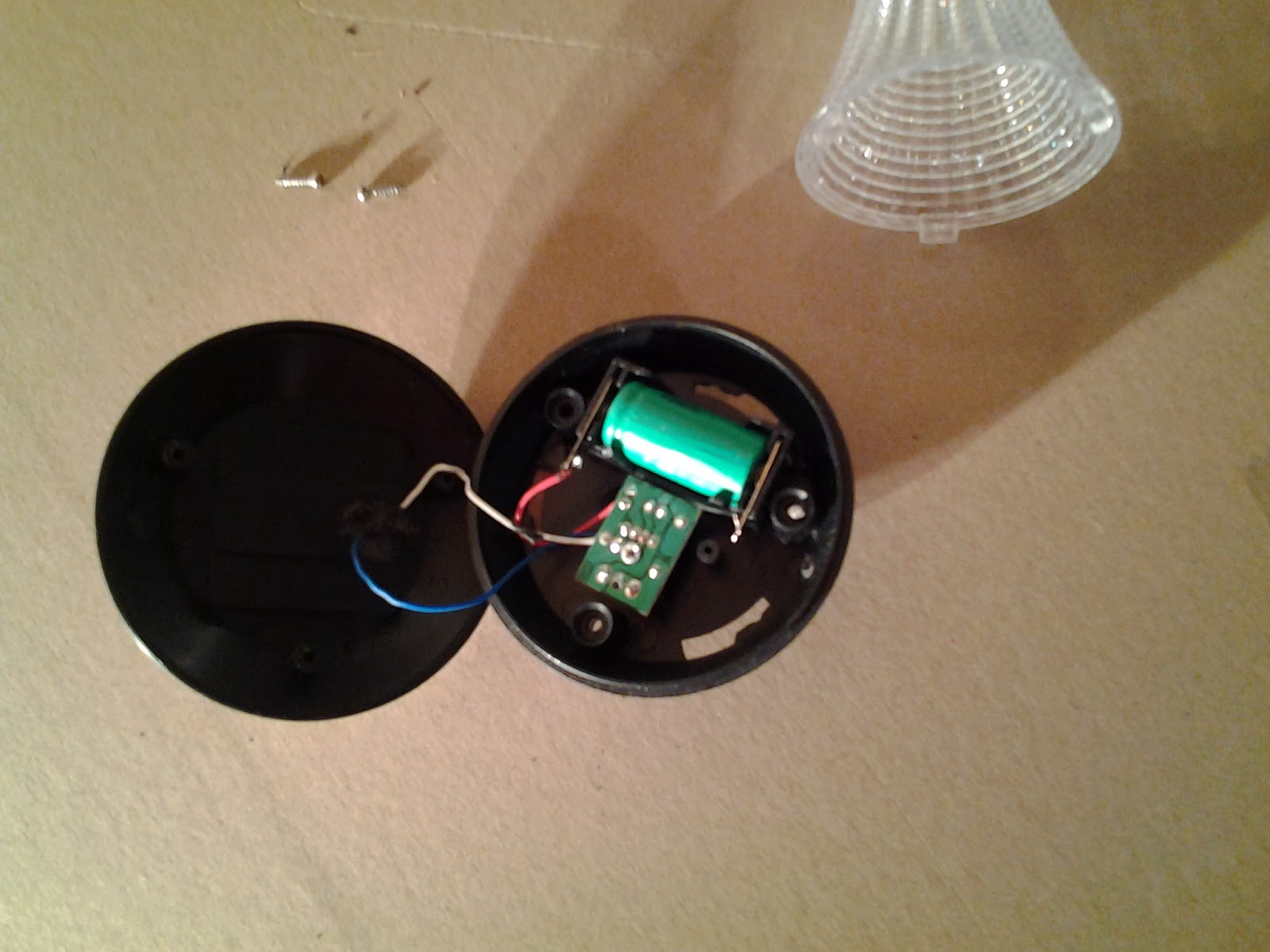
Garden solar light teardown
Bought 3 cheap garden solar lights, each < 1.00 Eur just to see how do they work. One did not work from the start. Another stopped working after a weak. Third worked well during all summer.
One had: circuit with a chip marked 5252F 1109, Ni-MH battery 2/3AA 300mAh 1.2V. Another with YX8018 0157 chip, Ni-MH battery 2/3 AAA 300mAh 1.2V.
Some Googling for those chips leads to these similar circuits:


Lamps by them self, nothing special to disassemble, just few photos:



Thursday, December 26, 2013
Usefull free software
Avast antivirus
http://www.avast.com/index
Super Anti Spyware
http://www.superantispyware.com/
Microsoft AppLocale Utility - Microsoft AppLocale is a utility that allows Unicode (UTF-16) based Windows XP and 2003 users to run non-Unicode legacy (code-page based) applications without changing the current system locale. AppLocale automatically detects language for non-Unicode program and simulates a corresponding system locale for code-page to/from Unicode conversions.
Download
Sandboxie
http://www.sandboxie.com/
http://www.avast.com/index
Super Anti Spyware
http://www.superantispyware.com/
Microsoft AppLocale Utility - Microsoft AppLocale is a utility that allows Unicode (UTF-16) based Windows XP and 2003 users to run non-Unicode legacy (code-page based) applications without changing the current system locale. AppLocale automatically detects language for non-Unicode program and simulates a corresponding system locale for code-page to/from Unicode conversions.
Download
Sandboxie
http://www.sandboxie.com/
Thursday, October 3, 2013
Debugging Oracle PL/SQL procedures using SQL Developer
1. Start SQL Developer and connect to DBMS.
2. Grant:
GRANT DEBUG CONNECT SESSION TO some_user;
GRANT DEBUG ANY PROCEDURE TO some_user;
3. Start remote debug, enter Port and IP address which is accessible from DBMS.
4. Execute "execute DBMS_DEBUG_JDWP.CONNECT_TCP('your ip',4000);".
5. Select procedure, add breakpoint, compile for debug.
6. debug procedure (ctrl+shif+f10), enter IP if needed.
2. Grant:
GRANT DEBUG CONNECT SESSION TO some_user;
GRANT DEBUG ANY PROCEDURE TO some_user;
3. Start remote debug, enter Port and IP address which is accessible from DBMS.
4. Execute "execute DBMS_DEBUG_JDWP.CONNECT_TCP('your ip',4000);".
5. Select procedure, add breakpoint, compile for debug.
6. debug procedure (ctrl+shif+f10), enter IP if needed.
Monday, January 16, 2012
PowerBuilder 8 OLE insert crash
I had same work with an old PowerBuilder 8 application maintenance and upgrade. While trying to add OLE control to a windows PB constantly crashed. PB and Windows XP reinstall didn't helped. I found a hint here http://brucearmstrong.wordpress.com/2007/07/10/problems-using-activex-controls/
In short:
1. Download Process Monitor
2. Add filter to pb80.exe process and path that begins with HKCR\CLSID
3. Try to add OLE with PB (make it crash)
4. Find last entry that ends with Control, search this CLSID with regedit
5. Reregister dll You found.
In my case it was regsvr32 %systemroot%\system32\mstscax.dll
Problem solved.
Subscribe to:
Posts (Atom)